ENGINEERING NOTES
Next.js 16.2: Faster Development, Rendering, and Better Debugging
Next.js 16.2 is here, bringing a collection of performance improvements, better debugging tools, and a smoother developer experience. The release includes more than 200 Turbopack fixes and improvements, alongside significant optimizations to development startup time, rendering performance, and error debugging.
Next.js 16.2: Faster Development, Rendering, and Better Debugging
Next.js 16.2 is here, bringing a collection of performance improvements, better debugging tools, and a smoother developer experience.
The release includes more than 200 Turbopack fixes and improvements, alongside significant optimizations to development startup time, rendering performance, and error debugging.
Next.js 16.2 is less about introducing massive new APIs and more about making the framework faster, easier to debug, and more pleasant to use.
✨ What's New in Next.js 16.2?
Here are some of the biggest highlights:
- ⚡ ~400% faster
next devstartup - 🚀 Up to ~50% faster rendering
- 🎨 Redesigned default production error page
- 🖥️ Server Function execution logging
- 🔍 Improved hydration mismatch debugging
- 🐛
--inspectsupport fornext start - 🔗
transitionTypessupport for<Link> - 🖼️ Significantly faster
ImageResponse - 🧩 Better
Error.causevisualization - 🔌 Adapters are now stable
- 🖼️ Automatic support for multiple icon formats
The release also includes dedicated updates around Turbopack and AI tooling, including AGENTS.md in create-next-app, browser log forwarding, and the experimental next-browser.
⚡ Faster Time-to-URL in Development
One of the most noticeable improvements in Next.js 16.2 is how quickly the development server becomes available.
The time required for:
next dev
to become ready at:
localhost:3000
has been significantly reduced.
According to the Next.js team, startup is approximately 87% faster compared with Next.js 16.1 on the default application.
That means less time staring at a terminal and more time actually writing code.
🚀 Faster Rendering
Next.js 16.2 also brings substantial improvements to React Server Components rendering.
A change contributed to React makes Server Component payload deserialization up to 350% faster.
What changed?
The previous implementation relied on a JSON.parse reviver callback.
Because the reviver crosses the C++/JavaScript boundary inside V8 for every key-value pair, even a simple no-op reviver could make parsing considerably slower.
The new approach uses:
JSON.parse()
followed by a recursive traversal implemented entirely in JavaScript.
This removes much of the boundary-crossing overhead while enabling additional optimizations.
Real-world impact
According to the Next.js team, this translates into approximately 25%–60% faster HTML rendering, depending on the size of the React Server Components payload.
Some reported benchmarks include:
| Scenario | Improvement |
|---|---|
| Server Component — 1,000 items | 26% faster |
| Server Component — nested Suspense | 33% faster |
| Payload CMS homepage | 34% faster |
| Payload CMS — rich text | 60% faster |
For example:
Server Component — 1,000 items

Before: 19ms
After:  15ms
And for Payload CMS with rich text:
Before: 52ms
After:  33ms
🎨 A New Default Error Page
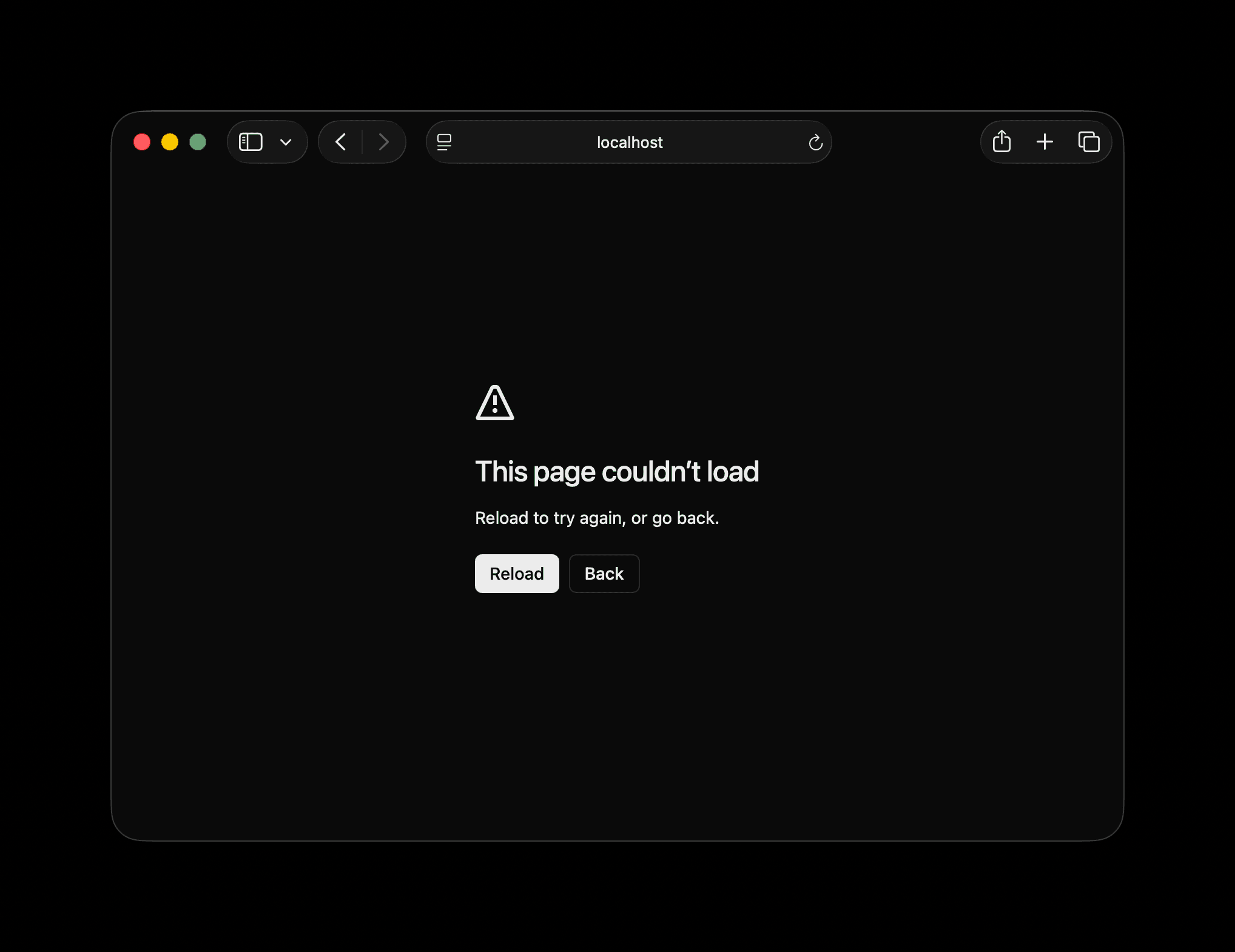
Next.js 16.2 introduces a redesigned default error page for production.
When an application encounters an error and doesn't define a custom:
global-error.tsx
or:
error.tsx
Next.js falls back to its built-in error page.
That fallback has now received a cleaner and more modern design.
🖥️ Server Function Logging
Debugging server-side behavior becomes easier in Next.js 16.2.
During development, Server Function executions are now logged directly in the terminal.
The logs include information such as:
- Function name
- Arguments
- Execution time
- File where the function is defined
This makes it easier to understand what's happening on the server without manually adding logs throughout your application.
🔍 Better Hydration Debugging
Hydration mismatches can be notoriously annoying to diagnose.
Next.js 16.2 improves the development error overlay by clearly showing which content came from the server and which came from the client.
The diff now uses:
+ Client
- Server
This makes it much easier to identify exactly where the server-rendered output diverges from the client-rendered result.
🐛 --inspect Comes to next start
Next.js 16.1 introduced:
next dev --inspect
which allows developers to attach the Node.js debugger while running the development server.
With Next.js 16.2, the same capability is now available when running:
next start --inspect
This can be particularly useful when investigating production issues or profiling:
- CPU usage
- Memory usage
- Server performance
🔗 transitionTypes for <Link>
The <Link> component now supports a new:
transitionTypes
prop.
It accepts an array of strings describing the types of View Transitions that should be applied during navigation.
For example:
<Link href="/about" transitionTypes={['slide']}>
  About
</Link>
Each transition type is passed to React through:
React.addTransitionType()
This allows applications to trigger different animations depending on the navigation direction or context.
Note: This feature is supported by the App Router. In the Pages Router, the prop is silently ignored.
🖼️ Faster ImageResponse
ImageResponse has received a significant performance boost.
The improvements include:
- 2× faster processing for basic images
- Up to 20× faster processing for complex images
- Improved CSS and SVG support
- Support for additional CSS properties
- New default font: Geist Sans
Among the newly supported CSS features are:
CSS variables
text-indent
text-decoration-skip-ink
box-sizing
display: contents
position: static
percentage values for gap
🧩 Better Error Cause Debugging
Errors often contain another error inside their cause property.
Previously, tracing these nested causes could be cumbersome.
Next.js 16.2 now displays Error.cause chains directly in the development overlay.
The causes are presented as a flat list, with support for up to five levels deep.
This makes wrapped and cascading errors significantly easier to investigate.
🔌 Adapters Are Now Stable
Adapters are officially stable in Next.js 16.2.
The API allows deployment platforms and custom build integrations to customize how Next.js builds an application or processes its output.
This can be useful for:
- Deployment platforms
- Custom hosting environments
- Build integrations
- Customizing the build pipeline
The Next.js team also announced that a more detailed overview of Adapters would follow.
🖼️ Multiple Icon Formats
Next.js can now automatically handle multiple icon files sharing the same base name but using different extensions.
For example:
icon.png
icon.svg
Both formats can be included automatically.
Modern browsers can use the SVG version while older browsers can fall back to PNG.
Next.js renders them as separate <link> tags.
🧪 Experimental Features
Next.js 16.2 also introduces several experimental capabilities.
unstable_catchError()
The new:
unstable_catchError()
API provides more granular control over error boundaries at the component level.
A custom error boundary can be created and placed anywhere within the component tree.
For example:
'use client'

import {
  unstable_catchError,
  type ErrorInfo,
} from 'next/error'

function CustomErrorBoundary(
  props: { title: string },
  { error, unstable_retry }: ErrorInfo,
) {
  return (
    <div>
      <h2>{props.title}</h2>
      <p>{error.message}</p>

      <button onClick={() => unstable_retry()}>
        Try again
      </button>
    </div>
  )
}

export default unstable_catchError(CustomErrorBoundary)
Unlike a traditional React error boundary, this API is designed specifically to integrate with Next.js.
It provides built-in handling for features such as:
redirect()notFound()- Server-side error recovery
- Client navigation
The API is currently limited to Client Components.
unstable_retry() in error.tsx
Another experimental improvement is:
unstable_retry()
inside error.tsx.
Previously, the reset() prop primarily cleared the error state and re-rendered the children.
That isn't always enough when an error originates from data fetching or the React Server Components phase.
unstable_retry() combines:
router.refresh()
and:
reset()
inside a transition.
This provides built-in retry behavior that can re-fetch data and re-render the affected route segment.
Example:
'use client'

import type { ErrorInfo } from 'next/error'

export default function Error({
  error,
  unstable_retry,
}: ErrorInfo) {
  return (
    <div>
      <h2>Something went wrong</h2>

      <p>{error.message}</p>

      <button onClick={() => unstable_retry()}>
        Try again
      </button>
    </div>
  )
}
⚡ experimental.prefetchInlining
Next.js 16 introduced per-segment prefetching.
Instead of requesting the entire route at once, the client can request individual segments of the route tree.
This improves cache efficiency because shared layouts between sibling routes can be fetched once and reused.
However, it can also increase the number of network requests.
experimental.prefetchInlining provides another approach by bundling all segment data for a route into a single response.
const nextConfig = {
  experimental: {
    prefetchInlining: true,
  },
}

export default nextConfig
The trade-off is that shared layout data may be duplicated across the inlined responses rather than being independently cached and reused.
🧭 experimental.cachedNavigations
Another experimental flag is:
experimental.cachedNavigations
It controls Cached Navigations behavior.
When enabled, static and dynamic Server Component data from navigations and initial HTML loads can be cached so that repeated visits can be served more quickly.
This feature requires:
cacheComponents
to be enabled.
📜 experimental.appNewScrollHandler
Next.js 16.2 also introduces a redesigned scroll and focus management system for the App Router.
The new handler uses React Fragment refs and improves how focus is managed after navigation.
Instead of automatically focusing the first deeply nested focusable element, the new behavior blurs the currently active element, more closely matching traditional browser navigation behavior.
📦 How to Upgrade
Ready to try Next.js 16.2?
You can upgrade an existing project using the automated codemod:
npx @next/codemod@canary upgrade latest
Or upgrade manually:
npm install next@latest react@latest react-dom@latest
Starting a new project?
npx create-next-app@latest
🧠 Final Thoughts
Next.js 16.2 is primarily a performance and developer-experience release.
Rather than radically changing how developers build applications, it focuses on making the existing workflow faster and easier to understand.
The biggest improvements are arguably the combination of:
- ⚡ Faster development startup
- 🚀 Faster Server Component rendering
- 🔍 Better hydration debugging
- 🖥️ Improved Server Function visibility
- 🐛 Better error diagnostics
- 🔌 Stable Adapters
- 🧪 More powerful experimental error recovery
For developers already using Next.js, this makes 16.2 a particularly interesting upgrade, especially for projects where development speed, server rendering performance, or debugging are important.
💬 What's your take?
Next.js continues to evolve beyond being simply a React framework, increasingly becoming a complete platform for building modern web applications.
Are these improvements enough to make you upgrade to Next.js 16.2?
Share your thoughts with the Zyther Dev community.
📚 Resources
Published by Zyther Dev — exploring the technologies shaping modern software development.