ENGINEERING NOTES
Next.js 16.3: Instant Navigations, Faster Builds, and Better Performance
Next.js 16.3 is here — and it's one of the framework's biggest updates since Next.js 16.0. This release focuses heavily on performance, developer experience, navigation responsiveness, caching, AI tooling, and debugging.

Next.js 16.3: Instant Navigations, Faster Builds, and Better Performance
Next.js 16.3 is here — and it's one of the framework's biggest updates since Next.js 16.0.
This release focuses heavily on performance, developer experience, navigation responsiveness, caching, AI tooling, and debugging.
The result is a Next.js release designed to make existing applications faster without requiring major code changes.
Next.js 16.3 brings SPA-like navigation responsiveness to the server-driven web — while keeping the benefits of Server Components.
✨ What's New in Next.js 16.3?
The release includes improvements across virtually every part of the Next.js development workflow.
Performance
- 🧠 Up to 90% less memory usage during development
- ⚡ Faster production builds with filesystem caching
- 🔎 Faster TypeScript type checking with TypeScript 7
- 🚀 Up to 22% more requests handled under load
- 📦 More efficient prefetching
- 💾 Better caching for immutable static assets
Developer Experience
- 🤖 Version-matched documentation for AI coding agents
- 🛡️ Custom error boundaries with server-side retry support
- 📂 Built-in
import.meta.glob - 🌍 Easier access to root-level route parameters
Instant Navigations
Next.js 16.3 also introduces an opt-in suite of features designed to make navigation feel much closer to a client-driven SPA:
- ⚡ Instant Insights
- 📦 Partial Prefetching
- 🔄 Better Incremental Static Regeneration
- 🔎 Navigation Inspector
- 🧪 Playwright support for testing instant navigation
There are also experimental features including:
- 🦀 A Rust-based React Compiler
- 🌐 Network resilience and offline navigation support
⚡ Less Memory Usage in Development
Long-running development sessions can consume a surprising amount of memory.
Next.js 16.3 addresses this with improvements to Turbopack's memory management.
The development server now uses up to 90% less RAM when running:
next dev
Two features are primarily responsible:
- Disk caching for development
- Memory eviction
Both are now enabled by default.
Reported results
After compiling 50 routes:
| Project | Before | After | Reduction |
|---|---|---|---|
| vercel.com dashboard | 21.5 GB | 2 GB | ~90% |
| nextjs.org | 4,600 MB | 840 MB | ~82% |
For large projects and developers who keep next dev running for hours, this can make a substantial difference.
🚀 Faster Builds
The filesystem caching improvements introduced for development in Next.js 16.1 are now also available to:
next build
and are enabled by default.
Instead of recompiling unchanged artifacts from scratch, Turbopack can reuse previously generated build artifacts.
The Next.js team reports seeing up to 5.5× faster builds in some production CI environments.
Example benchmarks
| Project | Cold | Cached | Improvement |
|---|---|---|---|
| nextjs.org | 21s | 9.2s | ~2.3× |
| vercel.com/home | 66s | 46s | ~1.4× |
| vercel.com/geist | 30s | 5.5s | ~5.5× |
This can be especially valuable in CI/CD environments where builds happen frequently.
🧠 Faster Type Checking with TypeScript 7
TypeScript 7 introduces a native implementation designed to dramatically improve compiler performance.
Next.js 16.3 can use TypeScript 7 for type checking during:
next build
To enable it, update your local TypeScript dependency:
pnpm add -D typescript@^7
The result is significantly faster type checking, particularly for large TypeScript projects.
🚀 Faster Server-Side Rendering
Next.js 16.3 also improves the App Router's server-side rendering pipeline.
The framework replaced Web Streams with native Node.js streams in the rendering layer.
Previously, Next.js had to convert between the two stream implementations during server-side rendering.
Removing that overhead improves throughput.
According to the reported benchmarks, applications can handle up to 22% more requests under load without changing application code.
Web Streams
    ↓
Baseline

Node.js Streams
    ↓
+22% requests
🤖 Versioned Documentation for AI Coding Agents
AI coding agents are becoming an increasingly important part of software development.
Next.js 16.3 makes it easier for those agents to work with the correct version of your framework documentation.
When running:
next dev
Next.js now maintains a version-matched:
AGENTS.md
This file points agents directly to documentation bundled with the version of Next.js installed in the project.
That means an AI coding agent can reference documentation that actually matches your project's APIs instead of accidentally relying on documentation from a newer or older version.
📦 Fewer Prefetch Requests
Next.js 16.3 also improves route prefetching.
Prefetches below a certain payload size are now automatically bundled together, reducing the total number of requests generated by navigation prefetching.
Larger shared segments remain separate so that they can still be reused across multiple routes.
The result is a more efficient balance between:
- Navigation speed
- Network usage
- Cache reuse
💾 Better Caching for Static Assets
Immutable static assets can now be reused across deployments.
Because these assets are immutable, they cannot suffer from the same deployment-skew problems associated with changing assets.
This can improve caching efficiency and reduce unnecessary asset downloads between deployments.
🛡️ Custom Error Boundaries
Next.js 16.3 introduces a more capable catchError API for custom error boundaries.
Previously, React error boundaries in Next.js had some limitations:
- They could interfere with
notFound() - They could interfere with
redirect() - They could only reset client-side state
- They couldn't properly retry Server Components that failed during rendering
With Next.js 16.3, you can define a custom error boundary using:
'use client'

import {
  catchError,
  type ErrorInfo,
} from 'next/error'

function ErrorFallback(
  props: { title: string },
  { error, retry }: ErrorInfo,
) {
  return (
    <div>
      <h2>{props.title}</h2>

      <p>{error.message}</p>

      <button onClick={() => retry()}>
        Try again
      </button>
    </div>
  )
}

export default catchError(ErrorFallback)
The boundary receives a retry() function that can refetch its children — including Server Components.
This makes error recovery considerably more powerful.
📂 Built-in Glob Imports
Turbopack now supports the Vite-compatible:
import.meta.glob
API.
This allows applications to import multiple files from the filesystem without manually creating individual imports.
For example:
import matter from 'gray-matter'

export default function Page() {
  const posts = import.meta.glob(
    './posts/*.md',
    { eager: true }
  )

  return (
    <ul>
      {Object.entries(posts).map(([path, mod]) => {
        const { data } = matter(mod.default)

        return (
          <li key={path}>
            {data.title}
          </li>
        )
      })}
    </ul>
  )
}
This is particularly useful for applications that read local files such as Markdown content.
🌍 Root Params
Dynamic route parameters can now be accessed more easily from Server Components.
Previously, parameters defined high in the route hierarchy often had to be passed down through props.
For example, consider:
app/
└── [lang]/
    └── posts/
        └── [slug]/
            └── page.tsx
A language parameter such as:
[lang]
can effectively behave like a global parameter throughout the application.
Next.js 16.3 introduces:
import { lang } from 'next/root-params'
which allows Server Components to access root-level parameters without prop drilling.
Example:
import { lang } from 'next/root-params'

export default async function PostPage(
  props: PageProps<'/[lang]/posts/[slug]'>
) {
  const { slug } = await props.params
  const language = await lang()

  return (
    <article>
      <p>Language: {language}</p>
      <p>Post: {slug}</p>
    </article>
  )
}
This is particularly useful for internationalized applications, where many components need access to the current language.
⚡ Instant Navigations
One of the most important parts of Next.js 16.3 is Instant Navigations.
The goal is simple:
Make server-driven Next.js applications feel as responsive as client-driven SPAs.
Server Components have significant advantages. They can reduce JavaScript shipped to the browser and avoid certain network waterfalls.
However, traditional server-driven navigation could sometimes feel slower than a client-side SPA.
Next.js 16.3 introduces a collection of features designed to solve that problem.
The framework is moving toward a simpler model where:
- Server Components remain central
- Suspense handles loading states
'use cache'provides explicit caching- Navigation becomes progressively more responsive
Two configuration flags enable the new behavior:
import type { NextConfig } from 'next'

const nextConfig: NextConfig = {
  cacheComponents: true,
  partialPrefetching: true,
}

export default nextConfig
🔎 Instant Insights
The Next.js DevTools now include Instant Insights.
The tool automatically identifies navigations that aren't instant.
This is important because slow navigation can be difficult to notice during development until it becomes a real production problem.
Instant Insights helps developers discover these cases and provides guidance for fixing them.
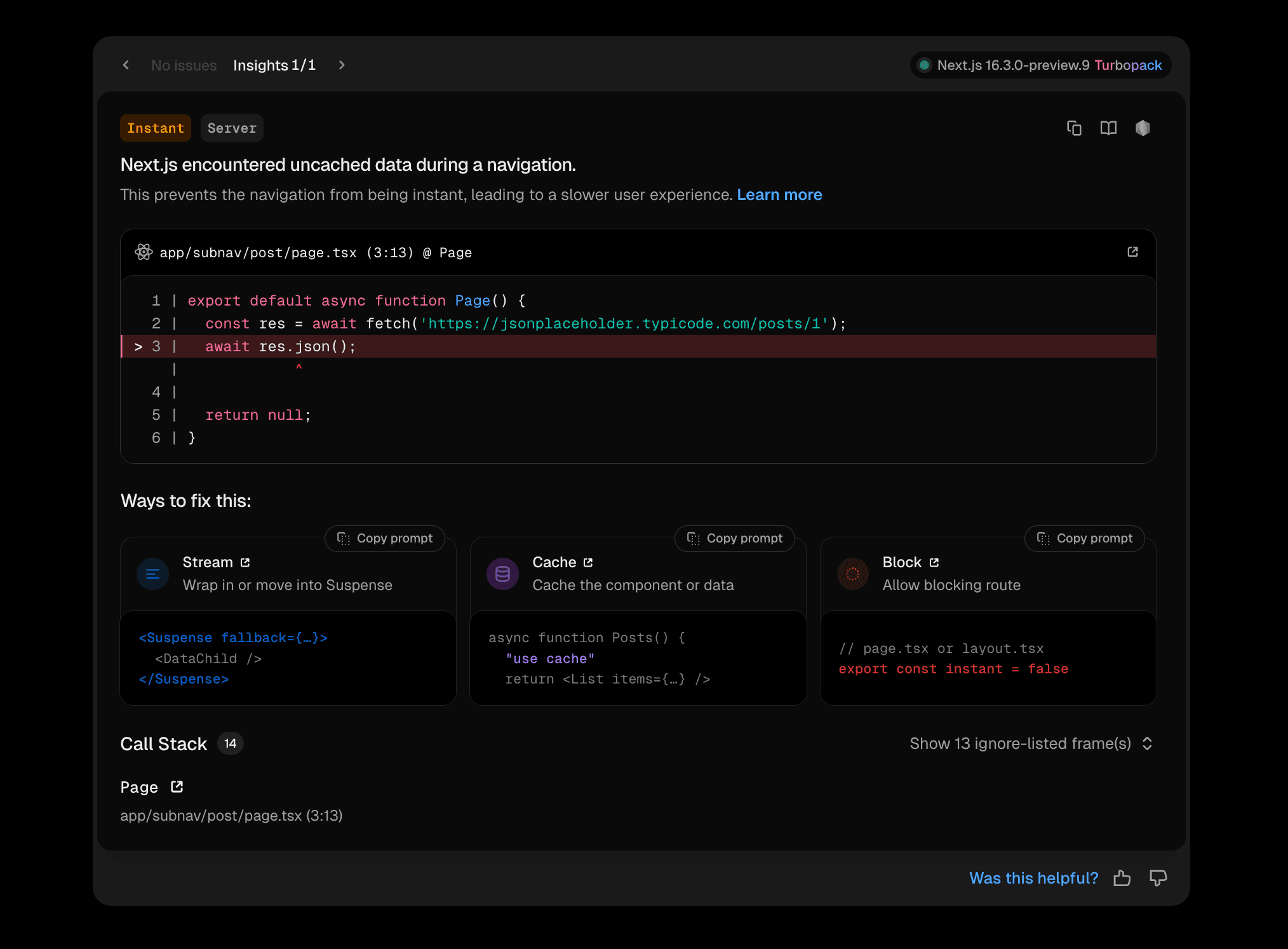
The tool can also provide prompts that help an AI coding agent apply the recommended fix.
📦 Partial Prefetching
Previously, Next.js offered relatively limited prefetching choices.
You could use:
loading.tsx
for reusable loading shells, or:
<Link prefetch={true}>
for more aggressive full-page prefetching.
Next.js 16.3 introduces Partial Prefetching.
Instead of choosing between very little and very much prefetching, developers can control how much of a destination route is prefetched.
Next.js can extract reusable loading shells from route UI and allow individual links to prefetch only the content they actually need.
This reduces unnecessary work while keeping navigation responsive.
🔄 Better Incremental Static Regeneration
Next.js 16.3 improves Incremental Static Regeneration (ISR) for dynamic and personalized applications.
Previously, when only some pages were prerendered using:
generateStaticParams()
developers faced a trade-off.
A page that wasn't prerendered could either:
- Show a loading shell but never become prerendered
- Skip the shell and block the first visitor
Next.js 16.3 allows both behaviors.
The first visitor can receive an instant loading shell, while the full page is generated in the background.
Later visitors can then receive the fully generated content from the cache.
First visit
     ↓
Instant shell
     ↓
Background rendering
     ↓
Cached full page
     ↓
Faster subsequent visits
🔎 Navigation Inspector
Understanding exactly what users see during navigation can be difficult in development because Next.js disables prefetching in that environment.
The new Navigation Inspector solves this by allowing developers to pause navigation at the loading shell.
This makes it possible to inspect exactly what users see while a route is loading.

This provides a much clearer way to reason about loading states and navigation performance.
🧪 Playwright Test Helper
A navigation can be fast today and unexpectedly become slow after a future refactor.
For example, adding a component that reads:
cookies()
to a shared header could change how a route is rendered.
Similarly, moving a <Suspense> boundary could cause part of a page to become blocking.
Next.js 16.3 introduces the:
instant()
Playwright helper.
It allows tests to assert exactly what should be immediately visible during navigation.
Example:
import { expect, test } from '@playwright/test'
import { instant } from '@next/playwright'

test('product title is available immediately', async ({ page }) => {
  await page.goto('/products/shoes')

  await instant(page, async () => {
    await page.click('a[href="/products/hats"]')

    await expect(
      page.locator('h1')
    ).toContainText('Baseball Cap')

    await expect(
      page.getByText('Checking inventory...')
    ).toBeVisible()
  })

  await expect(
    page.getByText('12 in stock')
  ).toBeVisible()
})
This means performance expectations can become part of your automated test suite.
🧪 Experimental Features
Next.js 16.3 also ships several experimental features.
These APIs are still evolving and must be explicitly enabled through configuration.
🦀 Rust-based React Compiler
The React Compiler automatically optimizes components at build time, reducing the need for manually tuning memoization.
Previously, the compiler ran through Babel inside Node.js.
Next.js 16.3 introduces an experimental Rust implementation running directly inside Turbopack.
Enable it with:
import type { NextConfig } from 'next'

const nextConfig: NextConfig = {
  reactCompiler: true,

  experimental: {
    turbopackRustReactCompiler: true,
  },
}

export default nextConfig
In tests against large applications such as v0, the Rust implementation reduced the time from next dev to a ready page by:
- ~34% on cold builds
- ~46% on warm builds
These gains assume the project has moved away from Babel entirely.
🌐 Network Resilience
What happens when the user's connection disappears in the middle of a navigation?
Normally, a soft navigation, data fetch, or Server Action can fail immediately.
With:
experimental.useOffline
Next.js can instead keep the operation pending and retry once connectivity returns.
Enable it with:
import type { NextConfig } from 'next'

const nextConfig: NextConfig = {
  experimental: {
    useOffline: true,
  },
}

export default nextConfig
You can also use the new:
useOffline()
hook to detect the current network state.
For example:
'use client'

import { useOffline } from 'next/offline'

export function OfflineBanner() {
  const isOffline = useOffline()

  if (!isOffline) {
    return null
  }

  return (
    <div>
      You're offline. Retrying when you reconnect.
    </div>
  )
}
Combined with Partial Prefetching, a route's loading shell can still be displayed even when the user navigates while offline.
Once the connection returns, the remaining data can continue streaming.
📦 Upgrade to Next.js 16.3
Ready to upgrade?
For an existing project:
npm install next@latest
Then start your development server and take advantage of the new performance improvements.
🧠 Final Thoughts
Next.js 16.3 represents a major step in the framework's evolution.
While previous releases focused heavily on individual performance improvements, this version goes further by rethinking how navigation, caching, prefetching, and server rendering work together.
The most interesting part isn't necessarily a single API.
It's the direction:
Server-driven applications don't have to feel slow.
With Instant Navigations, Partial Prefetching, improved caching, faster builds, lower memory usage, and better developer tooling, Next.js is attempting to combine the architectural advantages of Server Components with the responsiveness developers have come to expect from SPAs.
And perhaps most importantly, many of these improvements require little or no application-code changes.
🚀 Should You Upgrade?
If you're already using Next.js, 16.3 is a compelling upgrade.
The benefits cover almost every stage of development:
| Area | Improvement |
|---|---|
| Development | Up to 90% less memory |
| Builds | Up to 5.5× faster in reported cases |
| Type checking | Faster with TypeScript 7 |
| SSR | Up to 22% more requests |
| Navigation | Instant Navigation tooling |
| Prefetching | More granular and efficient |
| Errors | Custom boundaries + retry |
| AI | Version-matched documentation |
| Assets | Better cross-deployment caching |
| Tooling | New DevTools capabilities |
For large applications in particular, the combination of lower memory consumption, faster builds, improved rendering, and more responsive navigation could make a noticeable difference.
💬 What Do You Think?
Next.js is moving toward a model where Server Components, caching, Suspense, and client-side responsiveness work together rather than competing with each other.
Is Next.js 16.3 the direction modern React applications should be heading?
Let us know what you think.
📚 Resources
Published by Zyther Dev — exploring the technologies shaping modern software development.